RSS
 

Archive for the ‘Google Reader’ Category

When Propaganda Backfires

08 Jul

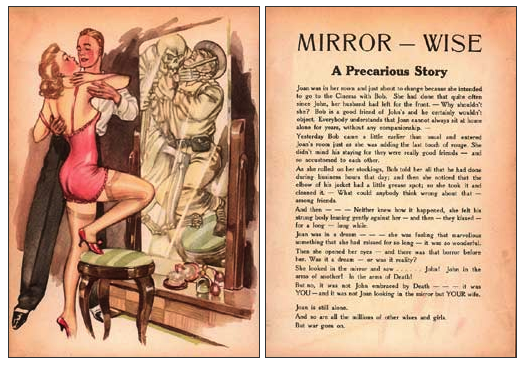
Blonde Bombshells


(image source: Psywar.org)

The Plan: During WWII, Axis powers attempted to wage psychological warfare against the Allies in a highly unusual way. They’d fly over enemy camps and drop pictures of buxom ladies on the troops. The twist? Most of the women were pictured in passionate embraces with strange men.

The Hope: According to German officials, the drops were meant to get GIs thinking about their wives and girlfriends back home-specifically, thinking about them being unfaithful. Axis propaganda wasn’t always so convoluted, though. Sometimes the Germans simply dropped pictures of scantily clad women posed over quotes such as “You can enjoy this if you surrender.”

The Disappointment: Surprise! Apparently, giving out free pictures of sexy women isn’t the best way to demoralize soldiers. Far from being upset, the GIs began collecting the pics and using them as pinups.

WISDOM FROM ABOVE


(Image Source: Flight’s Image of the Day)

The Plan: Soviet leader Joseph Stalin wanted to spread the message of communism far and wide, so in 1934, he enlisted the ANT-20, a massive aircraft with a wingspan of more than 200 feet.

The Hope: In addition to its jaw-dropping size, the plane contained multiple radio stations, a photo lab, and even a printing press for distributing leaflets midair. But the best thing about the plane (from a propaganda point of view) was its loudspeaker. Known as the “Voice from the Sky”, the sound system was so powerful that it could broadcast speeches and songs to the public from hundreds of feet in the air.

The Disappointment: Unfortunately for Stalin, the plane’s lifespan didn’t match its wingspan. In 1935, a fighter plane crashed into the giant aircraft during a demonstration over Moscow, killing 45 people. But that didn’t stop the propaganda from living on. Soviet officials quickly blamed the crash on the fighter pilot, Nikolai Blagin, and a new word, Blaginism, was introduced into the Russian language. It translates to “a cocky disregard of authority.”

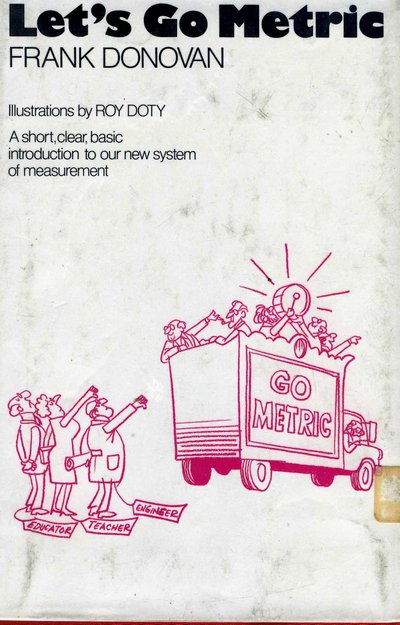
BOW TO YOUR NEW RULER


(Image source: Awful Library Books)

The Plan: In 1975, President Ford signed the Metric Conversion Act, and the United States embarked on a full-fledged campaign to join the rest of the world in using meters and grams.

The Hope: The federal government tried to get Americans on board by pumping tons of money into the effort. It funded metric-touring posters, pamphlets, and TV spots-including a series of animated shorts by the same team that did “Schoolhouse Rock.”There was even an answering service set up to help confused citizens.

The Disappointment: It turns out that citizens weren’t exactly rushing to borrow 225 grams of sugar from their neighbors or ask the grocer for 3.79 liters of milk. In 1982, President Reagan cut the campaign’s funding. Instead, he supported “voluntary metrication.” lettiing Americans choose whether or not they wanted to embrace the new measuring scheme. (They chose not to.)

__________________________

The above article was written by Maggie Ryan Sandford. It is reprinted with permission from the Scatterbrained section of the July-August 2010 issue of mental_floss magazine.

Be sure to visit mental_floss‘ entertaining website and blog for more fun stuff!


Simultaneously Publish Your Content to the Web, Facebook, iPhone and iPad

07 Jul


Mashable’s Spark of Genius series highlights a unique feature of startups. If you would like to have your startup considered for inclusion, see details here. The series is made possible by Microsoft BizSpark.

Name: Publisha

Quick Pitch: Publisha is a free browser-based solution that allows integrated publishing across digital platforms with built-in social media, analytics and revenue streams.

Genius Idea: Publisha is a free new platform that enables users to simultaneously format and publish content to the web, Facebook, RSS, iPhone and iPad from a single dashboard.

You can import and host your blog or online publication on publisha.com, or keep it at its current domain and simply take advantage of the service’s Facebook, iPhone and iPad publishing features.

The Facebook app is particularly robust. It creates an articles tab you can add to your Facebook Page, complete with a searchable archive, polls and other interactive content. Readers can like, rate and comment on the articles, and respond to polls.

You can also use the platform to publish your content on Publisha’s iPhone and iPad apps; the company has also offered to help “qualifying early adopters” create their own branded apps and drive traffic to their content. The apps host all participating publications on Publisha’s network. To minimize the size of the app, audio and video content are not supported.

Although Publisha is free to use, the company will take a 20% cut of all ad, affiliate and subscription revenue, and charge $2 per every GB of bandwidth used beyond 10GB if you decide to host your publication on Publisha’s website. It will also use 20% of your ad space if you have a free account. Publisha eventually plans to offer two premium packages — priced at $50 and $250 per month, respectively — that offer more bandwidth and take a smaller share of revenue.

Publisha’s Head of Marketing Anna Sjostrom also told us that an aggregated ad service is in the works, which will help match publishers with advertisers. The company also plans to add support for the Kindle and other e-book readers, as well as Ping FM and podcasts.

While we think the costs of Publisha’s services are pretty steep for users who want to build up a publication on publisha.com, we think many could take advantage of Publisha’s Facebook app and keep their sites on a blogging platform like Wordpress or on their own domains. It also couldn’t hurt to push your content to Publisha’s iPhone and iPad apps in the interest of attracting new readers.

What do you think of Publisha’s offerings? Do you plan to use them for your online publication?

[img credit: smaedli]


Sponsored by Microsoft BizSpark


BizSpark is a startup program that gives you three-year access to the latest Microsoft development tools, as well as connecting you to a nationwide network of investors and incubators. There are no upfront costs, so if your business is privately owned, less than three years old, and generates less than U.S.$1 million in annual revenue, you can sign up today.


Reviews: Facebook, WordPress, iPhone

More About: bizspark, Facebook app, ipad, iphone, publisha, spark-of-genius

For more Tech coverage:


ProPublica Photographer: I Was Followed by BP Security and Then Detained by Police

07 Jul

by Lance Rosenfield, Special to ProPublica

Freelance photographer Lance Rosenfield was working on assignment for ProPublica in Texas City, Texas, last week, when a BP security guard began following him. Rosenfield was later detained by police after taking photos for two ProPublica stories. One revealed that BP’s Texas City refinery had illegally emitted 538,000 pounds of toxic chemicals into the air in April and May. The other reported that the Texas City refinery continues to have serious safety violations five years after an explosion at the plant killed 15 workers.

What follows is Rosenfield’s account of what happened on Friday night after the police, accompanied by the BP security guard, stopped him at a local gas station.

I parked my car on the shoulder of Hwy. 197 near the Texas City sign that is in the pictures, on the south side of town and the refinery. I walked onto the median where the sign is and took the pictures. I walked back to my car and drove a couple of miles to a gas station that is on the way to my hotel. I noticed that what looked like a security truck, which had a light on the top, was following me, although he continued on when I pulled into the Valero gas station. I got out of my car to fill the tank and moments later two Texas City police cars pulled in next to my car, essentially blocking me in, although I wasn't trying to go anywhere, I was trying to get gas.

The first police officer asked me what I was doing and said he had gotten a report that I was taking pictures near the refinery. I told him I am a photojournalist and had only taken some pictures of a Texas City sign. He asked to see the pictures and I told him I didn't think I had to show them, legally. Another police officer walked up and again asked to see the pictures. I told him the same thing, but assured him that they were just pictures of the city sign, taken while I was in the public right of way.

He said I could show him the pictures or he could handle this another way, including calling Homeland Security and taking me in. I agreed to show him the pictures on the back of my camera, while he took my driver's license. Meanwhile, the truck that had been following me showed up, driven by a security guard with a BP patch on his uniform. The first police officer seemed to fade back during all this, but remained present in the background. I asked the second police officer-- Officer T. Krietemeyer--for his card, which he gave me. 

Officer Krietemeyer took my name, driver's license, the car license number, my D.O.B., Social Security Number and phone number.

The BP security guard asked for my personal information and I declined because he is a corporate security guard and I had already given it to the police. Then the BP security guard asked Officer Krietemeyer for my information, which he gave him.

I protested and asked on what legal grounds could the police officer share my information with BP? I was never on BP property. They told me it was standard procedure and I told them I didn't agree with it and didn't understand what legal authority they had to share that information.

They said that when there is a Homeland Security threat, then BP files a report. I said I wasn't a Homeland Security threat, that Officer Krietemeyer had already determined that the pictures posed no threat. Also, I was not under arrest, so why was BP getting my information? I asked the BP guard for his information, which he gave me: Gary Stief, BP Security.

They both told me they would call Homeland Security/FBI agent Tom Robison to come down and explain it, as if that were a threat to me. I said I didn't think that was necessary but Officer Krietemeyer called Mr. Robison anyway and handed me the phone, which I didn't ask for, but my natural reaction was to take the phone. They had already spoken to Mr. Robison when they arrived; when he got on the phone he asked what my problem is. I told him I didn't understand why BP was getting my information, but he had it anyway and we were starting to wrap up here. He said, "Oh no you're not, you're staying right there until I get there." This was obviously a scare tactic.

Mr. Robison arrived several minutes later and asked what my problem was. His demeanor was aggressive and antagonistic. I repeated myself, in a respectful manner. He aggressively explained that a refinery like this is a terrorist target and any time people take pictures of it, they have to investigate.

He asked who I was working for. I said I'm a freelance photojournalist working on assignment for ProPublica. He asked for verification of that so I showed him the letter from (ProPublica senior editor) Susan White. Officer Krietemeyer took down the information. Mr. Robison tried to dig at what the article was about, and I stayed mostly vague because I'm not the writer and I didn't see the significance anyway. Eventually he asked if it's about BP and I said yes, which seemed to make him angrier.

I then felt like Mr. Robison and Mr. Stief, the BP guard, started harassing me, primarily by keeping me there and talking to me in an aggressive and antagonistic manner, and relating what I had done to terrorist activity, ignoring what had actually happened. This went on for some time. I stayed calm and polite and on point.

Mr. Robison twice asked Officer Krietemeyer if had he reviewed the pictures carefully and concluded there was no threat, to which Officer Krietemeyer said yes. Mr. Robison seemed to be shaky with adrenaline; he was clearly worked up.

Stief said he was ready to go so the group broke up quickly.

I shook all three men's hands.

I'm guessing the whole thing lasted 20 to 30 minutes.


30+ Very Useful HTML5 Tutorials, Techniques and Examples for Web Developers

07 Jul

html5tutorials

HTML5 is being developed as the next major revision of HTML (HyperText Markup Language). The major market and internet leaders are already switching to the HTML 5 platform. With Apple and Google both pushing the standards in order to facilitate more advanced web development, we should see HTML 5 implementations popping up in the next year or two as more companies get on board with the advanced features.

With the constant drop of Flash usage in web and internet applications, HTML5 is opening new doors to web designers and developers. In this scenario, it is indeed imperative for every web developer to know about basic tutorials, tricks and terms of HTML5.

Here we present before you, a comprehensive list of more than 30 HTML5 tutorials and techniques that you can’t afford to miss if you are a web developer.

Create Offline Web Application On Mobile Devices With HTML5

image

A comprehensive article from the technical library of IBM by IT Architect Dietmar Krueger. In this article, the author describes and explains how challenging it i s to write application for operating systems and mobile platforms. Instead of relying on learning the platform specific languages like Objective-C with Cocoa (on iPhone), the author takes the open way of developing things through HTML5.  A very clearly explained and in-depth article.

HTML 5 Demos and Examples

image

HTML 5 experimentation and demos I’ve hacked together. Click on the browser support icon or the technology tag to filter the demos (the filter is an OR filter).

WTF is HTML5

image

One page overview of HTML5 – very useful!

Building a live news blogging system in PHP, Spiced with HTML5

image

This tutorial show you how to build a news website in HTML5 and CSS3. Every line of code is explained  for both HTML and CSS

Designing A Blog With HTML5

image

Much of HTML 5’s feature set involves JavaScript APIs that make it easier to develop interactive web pages but there are a slew of new elements that allow you extra semantics in your conventional Web 1.0 pages. This tutorial investigate these by setting u a blog layout.

Semantics in HTML 5

image

HTML 5, the W3C’s recently redoubled effort to shape the next generation of HTML, has, over the last year or so, taken on considerable momentum. It is an enormous project, covering not simply the structure of HTML, but also parsing models, error-handling models, the DOM, algorithms for resource fetching, media content, 2D drawing, data templating, security models, page loading models, client-side data storage, and more.

There are also revisions to the structure, syntax, and semantics of HTML, some of which Lachlan Hunt covered in “A Preview of HTML 5.”

In this article, let’s turn solely to the semantics of HTML. It’s something the author has been interested in for many years, and something which he believe is fundamentally important to the future of HTML.

HTML5 Web Applications

image

HTML 5 browser compatibility overview.

Dive into HTML5

image

Dive Into HTML 5 seeks to elaborate on a hand-picked Selection of features from the HTML5 specification and other fine Standards. I shall publish Drafts periodically, as time permits. Please send feedback. The final manuscript will be published on paper by O’Reilly, under the Google Press imprint. Pre-order the printed Work and be the first in your Community to receive it.

When Can I Use

image

Here you will find very useful compatibility tables for features in HTML5, CSS3, SVG and other upcoming web technologies.

HTML5 & CSS3 Readiness

image

How to Draw with HTML 5 Canvas

image

Among the set of goodies in the HTML 5 specification is Canvas which is a way to programmatically draw using JavaScript. We’ll explore the ins and outs of Canvas in this article, demonstrating what is possible with examples and link

Have a Field Day with HTML5 Forms

image

Forms are usually seen as that obnoxious thing we have to markup and style. I respectfully disagree: forms (on a par with tables) are the most exciting thing we have to work with.

Here we’re going to take a look at how to style a beautiful HTML5 form using some advanced CSS and latest CSS3 techniques. I promise you will want to style your own forms after you’ve read this article.

Coding Up a Web Design Concept into HTML5

image

Code a Backwards Compatible, One Page Portfolio with HTML5 and CSS3

image

HTML5 is the future of web development but believe it or not you can start using it today. HTML5 is much more considerate to semantics and accessibility as we don’t have to throw meaningless div’s everywhere. It introduces meaningful tags for common elements such as navigations and footers which makes much more sense and are more natural.

This is a run through of the basics of HTML5 and CSS3 while still paying attention to older browsers. Before we start, make note of the answer to this question.

Coding A HTML 5 Layout From Scratch

image

While it is true HTML5 and CSS3 are both a work in progress and is going to stay that way for some time, there’s no reason not to start using it right now. After all, time’s proven that implementation of unfinished specifications does work and can be easily mistaken by a complete W3C recommendation. That’s were Progressive Enhancement and Graceful Degradation come into play.

How to Make an HTML5 iPhone App

image

You’ve been depressed for like a year now, I know. All the hardcore Objective-C developers have been having a hay-day writing apps for the iPhone. You might have even tried reading a tutorial or two about developing for the iPhone, but its C—or a form of it—and it’s really hard to learn.

You can also do it with the skill set you probably already have: HTML(5), CSS, and JavaScript.

This tutorial show you how to create an offline HTML5 iPhone application. More specifically, I’ll walk you through the process of building a Tetris game.

Create An Elegant Website With HTML 5 And CSS3

image

Learn five macro-steps to build an effective website using brain, pencil, paper, Photoshop, HTML and CSS. But technology doesn’t stop, luckily, and we have other two great allies for the future to design better website: HTML 5 and CSS3.

Coding a CSS3 & HTML5 One-Page Website Template

image

See how to create a HTML5 web template, using some of the new features brought by CSS3 and jQuery, with the scrollTo plug-in. As HTML5 is still a work in progress, you can optionally download a XHTML version of the template here.

Design & Code a Cool iPhone App Website in HTML5

image

HTML5 is definitely the flavor of the month, with everyone in the design community getting excited about its release. In this tutorial we’ll get a taste of what’s to come by building a cool iPhone app website using a HTML5 structure, and visual styling with some CSS3 effects.

HTML 5 and CSS 3: The Techniques You’ll Soon Be Using

image

In this tutorial, we are going to build a blog page using next-generation techniques from HTML 5 and CSS 3. The tutorial aims to demonstrate how we will be building websites when the specifications are finalized and the browser vendors have implemented them. If you already know HTML and CSS, it should be easy to follow along.

HTML5 for Beginners. Use it now, its easy!

image

HTML5 for Beginners. Use it now, its easy! This article cover some of the HTML5 basics in a funny way…

Rocking HTML5

image

This presentation is an HTML5 website and it is a very informative and easy to use overview of the HTML5 elements.

Building Web Pages With HTML 5

image

Depending on who you ask, HTML 5 is either the next important step toward creating a more semantic web or a disaster that’s going to trap the web in yet another set of incomplete tags and markup soup.

The problem with both sides of the argument is that very few sites are using HTML 5 in the wild, so the theoretical solutions to its perceived problems remain largely untested.

That said, it isn’t hard to see both the benefits and potential hang-ups with the next generation of web markup tools.

HTML5 Cheat Sheet

image

HTML 5 Visual Cheat Sheet is an useful cheat sheet for web designers and developers designed by me. This cheat sheet is essentially a simple visual grid with a list of all HTML tags and of their related attributes supported by HTML versions 4.01 and/or 5. The simple visual style I used to design this sheet allows you to find at a glance everything you are looking for.

html5test.com

image

This is a browser test with a lot of detail. Very useful.

HTML5 Canvas Experiment

image

Time for us to play with this technology. We’ve created a little experiment which loads 100 tweets related to HTML5 and displays them using a javascript-based particle engine. Each particle represents a tweet – click on one of them and it’ll appear on the screen. (click on the image to see it in action)

HTML 5 Cheat Sheet (PDF)

image

html5 Pocketbooks

image

OK You have seen that HTML 5 is here, but should you use it?

Generally I think it depends on the site you are working on. If it is a high traffic commercial website you may want to hold it back a bit. However if it is a personal blog I believe it is time to get started and learn how to use the new features in HTML 5.

Actually HTML5 is used more than you may think already. You should check out the sites featured on HTML 5 Gallery and view source to see what they’re doing. Also there is already a HTML 5 Wordpress theme available.

Other interesting posts on this topic

Feed provided by tripwrire magazine, Visit this post here: Permalink


What Identities Are We Using to Sign in Around the Web? [INFOGRAPHIC]

07 Jul

The days of having a separate login and password for each online service we use are behind us. Now, you can log into most sites and services using your social network’s ID.

The most popular social identities are Facebook, Google, Yahoo, and Twitter, but are they always being used in the same way? The infographic below, courtesy of social optimization platform Gigya, shows that users trust different identities on different services. For example, users are most likely to log on to entertainment sites via Facebook, but when it comes to news sites, the login of choice is Twitter. Furthermore, the infographic shows what profile data is available to services after users log in using various online identities.

Check out a bigger version of the infographic here.


Reviews: Facebook, Google, Twitter

More About: facebook, gigya, Google, online identity, social networking, twitter, Yahoo

For more Social Media coverage:


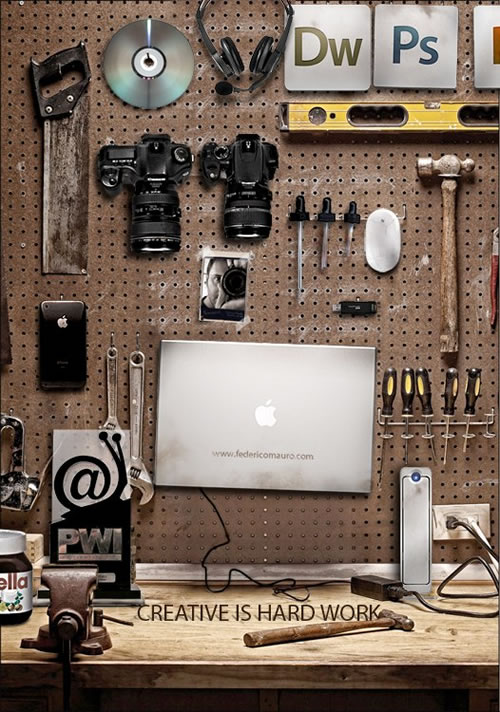
Digital Artist Workbench by Federico Mauro

07 Jul


Photo: Federico Mauro [Flickr]

Italian photographer and artist Federico Mauro created this clever take on what modern digital artist’s workbench would look like. More from his Flickr photoset Creative Is Hard Work: Link – via 9gag


Drawing done by waves

06 Jul

Japan is amazing, and here is another proof: they managed to draw by using… waves.

@ haha.nu

Related posts:

  1. Mysterious waves from M82
  2. He waves a goodbye
  3. Riding the Waves
  4. Jim Denevan’s Sand Drawing
  5. Online drawing tool


French Chateau Revives Old Shipping Method

06 Jul
bessie ellen yachtThe urge to be green and save energy is making some old transportation methods new again. Decanter reports that Chateau Smith Haut Lafitte will be exporting some wines by sailing ship as was done many years ago. The 106 year-old British ketch Bessie Ellen will sail from Bordeaux to Montreal leaving on July 21. It will carry 20,000 bottles of Smith Haut Lafitte and bottles from from Château de Cayx (the Cahors domain owned by the Danish royal family) and Borie de Maurel (Languedoc). The 25-day sail-powered crossing will cost around 20 percent more than sending the wine over in the usual container ship. But there may be another benefit, the shippers, Dublin-based, French-run CTMV say that the long ocean voyage could improve the wine, hastening the aging process. They plan to open a regular sail route between Montreal and Bordeaux, and Bordeaux-Plymouth next year.

The Bessie-Ellen was built in 1904 in Plymouth, England and is one of the last remaining sailing ketches. The website for the yacht says that it is for sale for 435,000 euros.

Filed under:

French Chateau Revives Old Shipping Method originally appeared on Luxist on Tue, 06 Jul 2010 19:01:00 EST. Please see our terms for use of feeds.

Permalink | Email this | Comments


Add to digg Add to del.icio.us Add to Google Add to StumbleUpon Add to Facebook Add to Reddit Add to Technorati

Bessie-Ellen - England - Cahors - Wine - Sailing ship


bottomless coffee cup

06 Jul

"bottomless coffee cup"


Birds Eye View of Shuttle Launch

06 Jul

"Birds Eye View of Shuttle Launch"