Filed under: Desktops

[Via NetworkWorld]Read | Permalink | Email this | Comments
Filed under: Desktops
 Two months ago, Google released a widget for iGoogle that allowed users to search for keywords in election related speeches on YouTube. Today, Google expanded the scope of this search to a larger selection of political videos and the widget graduated to become a full-blown Google Labs product named GAUDI. Interestingly, the tagline in Google Labs describes the product as a search for "what people are saying inside YouTube videos," even though its focus so far is very narrow. Over time, we expect Google to expand this service to cover a larger selection of videos or even all of YouTube.
Google currently only indexes videos in YouTube's "Politicians" channel, which includes both speeches and political advertisements. As Google explains, political speeches are a relatively easy target for speech recognition software because they have received a lot of academic and industry attention and are known to perform well. However, in the GAUDI faq, Google also hints at the fact that Google expects to expand this product beyond these political speeches in the future.

While the interface is very well designed, we can image a number of improvements. It would be extremely useful, for example, to be able to sort videos by date. Right now, they are always sorted by relevance, though in this fast-paced political season, it is often more important to know when somebody last used a certain phrase.
Also, while the variation on the YouTube video player Google uses here is well suited for this task, you can not embed the videos on your own site. All you get is a link to the video on the Audi Indexing site.
As of now, Google also doesn't offer an API for this service. Given Google's record, however, we assume that it will make an API available in the near future.
At times, like all speech recognition systems, GAUDI will also make mistakes. Overall, however, we came away impressed with the quality of the transcriptions.
Discuss It's easy to know where presidential candidates John McCain and Barack Obama stand on ever-hot topics, like the war or abortion. But what about various areas of scientific interest? Science Debate 2008 has made it their focus to clarify each candidate's stance on issues like genetics research, energy and space. The full text is available at that link, but for those who enjoy abridged versions, the New York Times did a nice job of cutting the big block of text into bite-sized pieces.
The NYT points out that both candidates agree that global warming exists, though McCain would like to see carbon emissions drop by 60% while Obama aims for 80%. Similarly, both agree that genetics research is promising but frightening in its implications, assuring to fight workplace discrimination based upon one's genetic code and continue the genetic modification of crops.
The biggest difference I noted was McCain's interest in space. It's one of the few responses where McCain's opinion is lengthier and more policy specific than Obama's, assuring continued NASA funding and naming space exploration as a "top priority" while citing project goals like shortening space shuttle redesign turnaround. Obama feels it's more important to delegate the responsibility/policy, opting to reinstate a White House Space Council.
But there's lots of interesting stuff we haven't even mentioned here. [Science Debate 2008 and NYT]

It'd be wonderfully convenient if you could take your important documents and applications with you wherever you go, but lugging a laptop with you every time you step out the door is far from convenient. That's where MokaFive's new cross-platform application called iPhone Sentinel comes in. By turning part of your iPhone or iPod touch into a portable hard drive, iPhone Sentinel and the MokaFive Player allow you to run virtual machines directly off your iPhone, so you can run anything from an entire operating system to standalone video games like Quake. Here's how it works.
There's a lot of different components to MokaFive's solution, so let's break down each component to understand how it all works together.
 First, MokaFive's main product is the MokaFive Player. It's a cross-platform (Windows and Mac) virtual machine software. MokaFive Player runs virtual machines named LivePCs. So the player is called MokaFive, and the individual appliances are called LivePC virtual machines.
You can run the MokaFive Player from a Windows or Intel Mac desktop or from a USB drive. If you just wanted to use the MokaFive Player locally to create and distribute LivePCs, you could just install it directly on your local computer. However, the MokaFive Player for USB drives can run any LivePC appliance portably from your thumb drive.
That's where iPhone Sentinel comes in. After you set up your iPhone with iPhone Sentinel, the iPhone works as a USB drive. Putting all the pieces together, then: You can run LivePC virtual machines with the portable MokaFive Player from your iPhone using iPhone Sentinel.
Now that you've got a better understanding of where we're going, let's walk through setting it up.

To get started, head to the Project iPhone Sentinel download page and grab the version that fits the operating system you'll be installing it on. I've tested the app on both Windows and Mac, and it looks virtually the same on both.

Now run iPhone Sentinel. You'll be prompted to connect your iPhone, so go ahead and do that. Once you do, the app explains that it "allows you to use your iPhone as a portable disk drive" and prompts you to allocate disk space. I gave about 2GB to iPhone Sentinel (which I think was the default). Keep in mind that you can't give more space to your iPhone than you already have free without losing data, so I'd heartily recommend backing up your iPhone if you haven't already and making sure you have enough space. When you're ready to pull the trigger, just click the Format button. Once you do, go grab a snack or warm drink—iPhone Sentinel took about 10 minutes or so to format the portable space on my iPhone.
 All done? You're halfway there, and actually already at a nice point: You can now use your iPhone as an external storage device—meaning you can actually put files on it and take it to different computers. There's a catch, though, which we'll discuss below.
Once your iPhone is set up for disk use, you're ready to install the MokaFive Player. Head to the MokaFive Player download page and grab the download that fits your operating system. Since we want to run the program from our iPhone or iPod touch, you should download the Mobility version for Windows or Mac. If you're hoping to run MokaFive Player on your Mac, you need to grab the Windows and Mac version and install it from your Mac. If you're planning on sticking to running the MokaFive Player on a Windows machine, get the Windows-only version.
 Either route you take is a breeze. On Windows, just run through the installer and tell it you want to install the MokaFive Player to a portable drive. On OS X, you just drag and drop the contents of the disk image directly to your iPhone drive. In both instances, make sure your iPhone's drivespace is mounted with iPhone Sentinel. That's all there is to it.

The iPhone Sentinel software is still very experimental, meaning that you can expect a lot of hiccups along the way. Right now the homepage says iPhone Sentinel only works with Windows XP SP2, though I was able to get it to work on OS X 10.5 as well as XP SP2.
Running the MokaFive Player from my iPhone, on the other hand, was another story altogether. MokaFive uses VMware's player to run its virtual machines; in fact, you need to have VMware pre-installed on a Mac if it's even going to work.

The first time you run it, you'll have the option to run pre-installed machines, like the Fearless Browser or Linux XP (a flavor of Linux that very closely mimics Windows XP). You can also grab several different free LivePC appliances from the MokaFive web site, including business-oriented apps like OpenOffice.org and fun stuff like Quake or the One Laptop Per Child operating system.
 My biggest complaint with MokaFive right now is that—as far as I can tell—you have to have iPhone Sentinel installed on any computer you want to use your iPhone as a disk with. That's probably going to be a major deal-breaker for some, since it presents a circular problem. Normally in this sort of situation you'd bring iPhone Sentinel with you on your portable drive. You could put iPhone Sentinel on your iPhone, but you wouldn't be able to get to it without using iPhone Sentinel to begin with. That's a problem. If you give it a try, I'd also recommend caching all of your virtual machines for offline use—otherwise you'll have to download them anew every time you plug in your iPhone.
If MokaFive is going to really wow, it'll need to tackle these problems soon. In the meantime, both the iPhone Sentinel application and MokaFive Player present some interesting and worthwhile functionality on their own. Right now MokaFive is a pretty cool app for running and distributing streamlined virtual machines, and—if the folks at MokaFive can get it all working well on the iPhone—your phone could turn into your all-in-one portable drive and operating system.
Until that happens, you may want to stick with iPhone Sentinel to enable disk mode on your iPhone, then grab some portable apps and carry your life on a thumb drive. Alternately, if you just want to run Windows from your iPhone, check out the much more stable, robust MojoPac, and build your PC on a stick. I haven't tried this, but considering that iPhone Sentinel essentially turns a portion of your iPhone into a thumb drive, it should work just fine.
If you've got any experience with MokaFive or with dual-purposing your iPhone's drive, share your experience in the comments.
Adam Pash is a senior editor for Lifehacker who can't believe disk mode isn't available on the iPhone by default. His special feature Hack Attack appears every Tuesday on Lifehacker. Subscribe to the Hack Attack RSS feed to get new installments in your newsreader.
Juniper Research is projecting social networking is expected to overtake dating in 2009 to become the largest revenue generating segment.
Social networks are projected to generate $7.3 billion in advertising revenues by 2013. That will amount to a steady rise in revenues over 2008's projected $1.1 billion.
According to report author Dr. Windsor Holden, "It's clear that we have seen an industry wide shift regarding the implementation of business models in this area. Whereas initially there was a perception that users would pay a small mobility premium to access social networks on their handsets, it rapidly became clear that to achieve truly mass adoption, it would be necessary to offer free membership and then to augment that with advertising and the sale of premium content."
Meanwhile, Hitwise general manager of global research, Bill Tancer, is saying that searches for pornography are down about 50% due to increase in searches for social networking.
"My theory is that young users spend so much time on social networks that they don't have time to look at adult sites," Tancer told Reuters.
Tancer analyzes search behavior and its reflection on society in his new book, Click: What Millions of People are Doing Online and Why It Matters.
What do you think of the rise in social networking? Is it changing societal behavior? Give us your thoughts in the comments.
Related Reading:
Social Networking and Employees: Where Do You Draw the Line?
AOL's Platform-A to Offer Guaranteed CPM to Facebook, Bebo Developers
 A few years back I read an enlightening article on Red Bull detailing how a series of brilliant steps turned a cough syrup soda into a world-leading energy drink. At the time, their factory employees generated $1 million apiece—a figure that almost makes sense when weighing the cost of mandatory personnel alone. Now Nintendo does one way better. All of their 3,000 employees will combine this year to produce a cumulative $1.6 million per head—after salaries.
(Ironically, Nintendo's figure doesn't include factory employees since they outsource production.)
Nintendo's earnings are better than the 2007 reports from Goldman Sachs ($1.24 million per head, pre salaries) and Google ($628,000 per head). And if anything, Nintendo claims their numbers are an underestimate since many of their employee salaries are written off as R&D. They'd also like you to pick up a Wii if you still have not. [FT via DevelopMag and image]
 You’re slaved over your post - crafting titles, opening lines, designing the post to be eye catching and more - you select the perfect time for your post to go live and hit ‘publish’!
It’s over - another post ‘released’ into the wild - there’s nothing more you can do except sit back, see how people like it and start on your next post…. or is there?
Instead of seeing the moment of publishing a post as the end point in the posting cycle of a post - I see it as the birthing moment of a post. The work has only just begun and what you do in the minutes and hours after it goes live can exponentially increase the effectiveness of the post!
Original Image by Elephi Pelephi
A lot is written about promoting and marketing blogs (as a whole) but I’ve found looking at ‘promotion’ on a more micro level (at a post by post level) can be a highly effective strategy.
Having hit publish on your post - don’t just leave it to chance that your post will be read by people. Giving it a few strategic ‘nudges’ can increase the exposure it gets exponentially.
Let me describe a few post promotion activities that I engage in.
note: I don’t use all of these techniques on every post but instead see them as a variety of tools that sit in my blog promotion toolbox and pull out different ones on different posts depending how suitable they are.
One of the most effective ways of getting the word out about a new post is to let other bloggers know about it. There isn’t much more powerful a way to find new readers than another blogger recommending something you’ve written to people who trust them.
Getting other bloggers to link to your posts is not always easy though - particularly in the early days of a blog or if you don’t have some sort of profile or pre-existing relationship with the bloggers that you’re pitching. However it isn’t impossible. Here are a few tips on how to pitch your posts to other blogs:
Read more tips like these on pitching other bloggers at 13 Tips on Asking other Bloggers for Links.
An increasingly large source of traffic for my own blogs over the last year has been Twitter and other social messaging sites (like Friendfeed and Plurk). I use a mixture of automated tools and personalized tools to drive this traffic. On twitter I use TwitterFeed to tweet items from my blog’s RSS feed.
I find that this works best if your blogs feed is not the only thing that you’re putting up on Twitter. Add your own personal tweets, link to other people’s content, ask readers questions etc - the more you mix it up the more effective your own automated tweets will be accepted and clicked upon by your followers.
Don’t be afraid to use social messaging to promote posts that have good discussion on them also. I find that 12-24 hours after my post goes live can be a good time to shoot out another tweet if there’s a particularly hot conversation going on (in fact this can drive even more traffic than the first TwitterFeed automated tweet as it alerts your followers to a conversation rather than just content).
This is something that I only do on selected posts - those that I think could do well on bookmarking sites like Digg or StumbleUpon.
I won’t go into great depth on this topic in this post as I recently wrote on how to get to the front page of Digg and have posted other tips at Using Social Media Sites to Grow Your Blog’s Traffic.
A great deal of blog promotion tips focus upon how to promote your blog on other people’s blogs and sites - but a great way to promote your blog post is to do it on your own blog.
One thing that I try to do with my best posts after I publish them is to think about where I could promote it on my own blog.
While it is at the top of my blog’s front page (the primary place to promote it) if you think hard you’re bound to find a few other posts in your archives that you could link to this new post. Find places where you’ve covered similar topics before and add your link as a ‘related reading’ link or even add a link to your new post within the content of an old post.
You might also want to add your new post to previously written ‘sneeze pages‘ or your sidebar if it’s a key post. Every link you add on your own blog to your new post potentially sends your current readers to your new post but also helps your blog with Search Engine Optimization (internal links count too).
If you have a newsletter list on your blog and you’ve written what you consider to be a key blog post - include a link to it in your next newsletter. Doing this will drive traffic but also signal to your readers that it’s a pillar post that you feel deserves their attention.
As with each of the points above - only do this with your best and most relevant posts. If you do it with every post reader will become desensitized to your recommended reading.
NOTE: tread carefully with this one and only do it occasionally and in a way that adds value.
If you’ve got a post that you think relates strongly to something that another blogger has written about or that is the topic of discussion on a forum - leave a link to your own post.
The key to pulling this off without being labled a spammer is to leave a genuinely useful comment on the blog or forum. The comment itself should add value, be right on topic and contribute to the conversation. Then if you include a link introduce it with a ‘I’ve written more about this at….’ type comment rather than just a spammy call to action.
The other option is to email the other blogger first and ask if they’d mind if you leave the link. You might even find that the blogger will add the link to the post itself (don’t assume this).
If you use a service like Feedburner they have a little widget that you can add to your email signature that highlights your latest blog posts. I’m not sure how effective that this is at driving traffic but the principle is a good one.
I know of a couple of bloggers who do the same thing by hand - they pick one or two of their latest key posts and add links to them as ‘featured posts’ in their email signatures. Many of us have links to our blog’s main URL in our email signatures but it strikes me that a link to a recent individual post could actually be more effective as it sends people to your very best content - food for thought.
If you’ve just written a post that you feel is important a great technique to give it a second round of attention is to write a second post extending the first in some way.
This technique is very powerful at adding a sense of momentum to your blog.
‘Treat every post as an introduction to your next’. Here’s an image that describes this process taken from How to Keep Momentum Going by Building on Previous Posts.
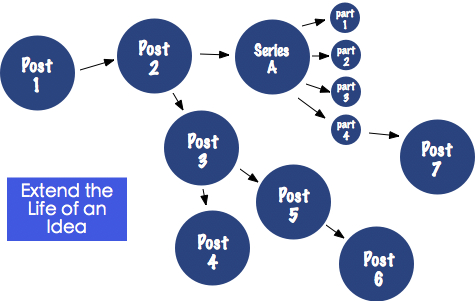
Also check out how I use Mind Mapping to extend posts and do followups like this.
This one won’t be for everyone and is definitely only for those special posts that you write that you particularly want to drive traffic to - but why not put a little budget aside to promote a post with some advertising.
Key posts that have a high ‘usefulness factor’ to potential readers are a great way to find new loyal readers to a blog. Rather than advertising the front page of your blog a high quality post can actually be the perfect landing page for an advertisement.
There are a variety of ways to advertise a blog but one of my favorites is on StumbleUpon where you can actually start an organic rush of traffic to a good blog post with a relatively small budget. Learn more on how to do it at Run a StumbleUpon Advertising Campaign for your Blog.
The list could go on - here are a few more quick tips on how to promote individual blog posts:
I’ve covered 12 ways to promote an individual blog post above. What would you add?
How have you done it? What success have you had?
Keep in mind I’m not asking about how you promote your blog in a general sense - but how do you drive traffic to individual blog posts?
This post is part of a series on how to craft blog posts. It will be all the more powerful if taken in context of the full series which looks at 10 points in the posting process to pause and put extra effort. Start reading this series here.
Javascript can add a lot of special effects that can really improve the user's experience. Here are 10 simple and clever Javascript techniques that add an extra dose of usability to any webpage.
