RSS
 

Big new Basecamp feature: Attach files and post comments on to-dos and milestones

08 Sep
Jason via Signal vs. Noise shared by 4 people

Today we’re thrilled to be able to announce a big new addition to Basecamp: You can now attach files and post comments on to-dos and milestones. Previously this functionality was only available on messages.

Watch a bigger version of this video on the 37signals Product Blog.

A quick look at how it works

A green comment icon after a to-do or milestone means there are new comments on that item. A dark grey comment icon means there are comments on that item, but you’ve already read them. And if an item doesn’t have any comments, you’ll see an empty comment icon when you hover over that item. Clicking the comment icon will take you to the comments view for that to-do or milestone.

Deeplinking: A happy side effect

This new feature comes with a great side effect: You can now deep link to individual to-do items or milestones. Previously you could only link to a to-do list or the milestones section, but now you can link directly to individual to-dos or specific milestones.

Project management is communication

This new feature is directly in-line with Basecamp’s core premise: Project management is communication. Before you had to keep all your discussions in the messages section. That worked, but it required you to discuss one part of your project in another part of your project. Now you can have discussions about to-dos and milestones right on top of those to-dos and milestones.

We hope you love it

We’re really excited about this new feature. We think it’s going to help you get a lot more more out of Basecamp. Thanks again for your continued support!
 
Comments Off on Big new Basecamp feature: Attach files and post comments on to-dos and milestones

Posted in Uncategorized


Does Your Computer’s Operating System Still Matter? [Reader Poll]

08 Sep
Gina Trapani via Lifehacker shared by 9 people

New York Times writer Joe Nocera argues that the Windows operating system doesn't matter any more, because webapps are rendering all operating systems irrelevant. He asks: Do you really care anymore...
 
Comments Off on Does Your Computer’s Operating System Still Matter? [Reader Poll]

Posted in Uncategorized


TravelMuse: the Social Trip Planner

08 Sep
the Social Trip Planner

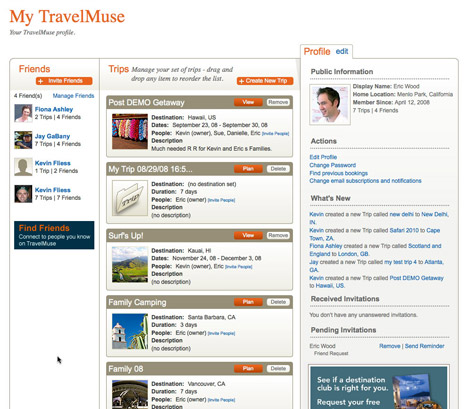
[DEMOFall 08] I recently tested an innovative travel site PlanetEye so, when I saw this one in the DEMO company list I wanted to try it. TravelMuse is less visual exploration oriented than PlanetEye and it also offers the social networking component that a lot of new travel sites have now. Having performed a quick test late at night, I cannot tell about the extended features. It seems that this site allows more collaboration with co-travelers than any of the sites that I visited. The Trip Planner is the core of the user experience and it allows people to collect all their interests and potential activities in a very interactive schedule page that displays a day by day plan. It is possible to collect information found on TravelMuse and on other sites. The option to share any trip information found on TravelMuse with a wide selection of social networking sites is also pretty neat. I like the combination of information discovery, collaborative social networking and the solid booking engine capability (provided by WorldChoice Travel, a division of Travelocity).

Add a comment | From: TravelMuse: the Social Trip Planner | Visit Ubergizmo

 
Comments Off on TravelMuse: the Social Trip Planner

Posted in Uncategorized


“Studies Recommend Surgery For You” (But The Studies Can’t Be Found) [Health]

08 Sep

Seth Robert's doctor discovered he had a tiny hernia and referred him to a general surgeon, who recommended surgery. Seth, a psychology professor at UC Berkely and author of The Shrangri-La Diet, asked why. "It could get worse," she said. "Why is it better to have surgery than not," asked Seth. "Surgery is dangerous, expensive, and time-consuming." The surgeon said clinical trials showed the benefits of this surgery. "Just use Google, you'll find them." Seth tried to find them. His mom, who does medical searching as her job, couldn't find any completed clinical trials.

When he told the surgeon that he couldn't find the studies, she said, "Well find some and copy them for you." Over a month later, the studies had never materialized. Perhaps they don't exist.

Maybe the doctor is just lazy or busy or misinformed or didn't feel like having Seth as a patient, or maybe she wanted to bill for unnecessary surgery. Either way, it's important to ask your doctor questions about the procedures and care they advise, and ask for evidence and more information to back up their recommendations, especially when you're unsure about their efficacy.

(Photo: aesop)


Comments Off on “Studies Recommend Surgery For You” (But The Studies Can’t Be Found) [Health]

Posted in Uncategorized


Our Shot – March 26, 2008 – National Geographic magazine – NGM.com

08 Sep

Trees in the mist, Brazil

via http://ngm.typepad.com/our_shot/march-26-2008.html

 
Comments Off on Our Shot – March 26, 2008 – National Geographic magazine – NGM.com

Posted in Uncategorized


Usable Login: the Universal Login

08 Sep
the Universal Login

[DEMOFall 08] Finally! Someone is coming up with a universal login for the internet, that will (I hope) replace the painful-to-use Open ID. I have not tested the service yet, so I will update this article after I do. Idea: the user can download a UsableLogin browser extension, personalize it with a photo and a password that is an easy word to remember for them. Each time he/she needs to login to a website, whether it is a bank account or a social network, the UsableLogin box appears and the simple password is typed. The photo is also part of the security features, when the user sees it, it means that the web site he/she is login into has been authenticated. The technology behind the box creates a complex password that is only used by that website, it combines the user's codeword with secret information from different sources like the computer the person's is using, the Usable Security's servers and the website. UsableLogin is compatible with any browser or operating system. The interesting concept is that Usable Security never stores the user's word and websites never see it. That's great!

It will be available in early 2009 and you can get it from the Usable website.

Add a comment | From: Usable Login: the Universal Login | Visit Ubergizmo

 
Comments Off on Usable Login: the Universal Login

Posted in Uncategorized


no description

08 Sep

"no description"
 
Comments Off on no description

Posted in Uncategorized


no description

08 Sep

"no description"
 
Comments Off on no description

Posted in Uncategorized


little girl in fields of dreams

08 Sep

"little girl in fields of dreams"
 
Comments Off on little girl in fields of dreams

Posted in Uncategorized


I had to lie on the floor to take this picture which security was not too happy with.

08 Sep

"I had to lie on the floor to take this picture which security was not too happy with."
 
Comments Off on I had to lie on the floor to take this picture which security was not too happy with.

Posted in Uncategorized