"Nuclear Test"

Software and webapps rock at being calendars: You can update them from any computer or your phone, they don't have to triple-check when Columbus Day is, and they never get coffee stains on them. But your online or desktop calendar can do a lot more than just hold dates and tell you about them. Free programs and tweaks can integrate appointments into your email app, embed a whole-month view into your wallpaper, schedule birthdays without a single phone call, and improve your faulty memory for everything. Take a look at 10 free and customizable hacks you can apply to your own appointment-keeping system. Photo by Joe Lanman.
 Google Calendar offers a subtle, tucked-away little feature that can make renting out a projector or booking a conference room deadly simple. You can set up a calendar to auto-accept invitations that don't conflict with others. Even if you're just sharing a grill with some neighbors, it's a simple way to ensure everybody's on the level.
 Unless you want to be that person, the one who interrupts conversation and distracts everyone by pulling out and pecking at a PDA, you're not going to have your calendar on you at all times. That doesn't mean you can't commit to dates, scope how long a project might take, and remind yourself of important dates with a compact calendar from designer David Seah. It fits in a wallet or on the edge of a notebook, and does what you need a calendar to do when you're not at your desk.
 You don't have to make all the content on a useful, productive calendar. In fact, you can automatically number your weeks, get daily weather forecasts, embed your Remember the Milk tasks, and add publicly-offered content at Google's gallery to track your favorite sports team, keep up on politics, or know what's new on DVD this week. It's helpful scheduling that you don't have to lift a finger to benefit from.
 The Web 2.0 social-site explosion has created a wealth of scheduling services, but we've always liked the simplicity of tools like Doodle, where you just ask folks via email what times work for them, and the site returns the most compatible matches. Need more than just a time slot? fasterPlan creates web-based, customizable billboards, so you can ask which park works best for a reunion, who's a vegetarian, and so on. If nothing else, your over-burdened inbox will thank you.
 It's no secret we're fans of the command line around these parts, especially apps that let you add and control information as fast as you can type. That's exactly what Remind is. The app takes in simple text commands to add or display appointments, either in line-by-line text or ASCII-formatted grids. As shown in our guide to plain text calendar management, Remind is based on an old Unix tool, so Linux, OS X, and Windows users (using Cygwin) have equal access to it.
 Prepare to have social networking service Facebook actually save you time you would've spent typing and clicking. The site already keeps track of all your friends' birthdays, but free plug-in fbCal makes them accessible to iCal-compliant calendar client. It might take a bit to get working, but once it does, you'll be seen as a gracious friend, one who's on top of even the most obscure third-cousin birthdays.
 Gmail and Google Calendar already go well together, with Gmail able to detect and add appointments to GCal, and having them on the same page can serve as an Outlook-like "Today" page. Two Greasemonkey scripts for Firefox make it easy to embed GCal directly into your email: Gmail Addons pops your calendar (or any other web applet, really) in and out of any corner of Gmail, while GMailAgenda throws a vertical calendar rail into a right-hand rail. Want to add Remember the Milk's advanced task-management to your all-in-one start page? You can easily do that too.
 The "tickler" file is an idea that reporters, creative executives, and other old-school, productivity-minded types have been using for decades to stash away to-dos and ideas that don't come into play until later on. While modern calendar tools are great for accessibility and ease of use, they lack that ability to make you encounter things whether you want to or not—everything is, after all, dismiss-able with a mouse click. Gina wrote up a guide to setting Yahoo Calendar to tickle you automatically back in Lifehacker's earliest days, but the concepts and instructions are still relevant for Google Calendar, Outlook, or any system that can remind you.
 Whether you were the type to order one of those gigundo desktop calendars and use it as your ambient appointment reminder, or you just don't have a need for flashy desktop wallpaper, an embedded computer desktop calendar can do wonders for your memory. And you've got more than a few implementation options. Mac users can incorporate a text calendar and any other files onto their backdrop using GeekTool, Outlook devotees can use the appropriately-titled Outlook on the Desktop or text-based DeskTask, Windows (and Linux) workers can try the excellent Rainlendar widget, and Gina wrote up a guide to embedding any text on your desktop with Windows tool Samurize.
 There are, shockingly, times when computers aren't connected to the internet, and also times when heading to Google Calendar in a browser isn't as convenient as your on-demand calendar program. With the introduction of CalDAV support, Google Calendar can now perform two-way syncs with any desktop client, and Adam has taken the time to show us how. Even if you use a calendar site or app not described in the how-to, hooking up a publicly-accessible feed in the widely-supported GCal is usually a first step to taking your scheduling information anywhere you go.
Of course, these are just our own favorite calendar tricks, and each person has their own schedule-and-remember style. What calendar add-ons or third-party tools can't you live and work without? Which calendar features go unheralded? Share the good stuff in the comments.
T-shirt gets Van Nuys woman kicked out of federal building (via Neatorama)As she headed for a line to pick up a Social Security card for her son, Gilbert was stopped by a guard who said her T-shirt, naming an educational and resource Web site for gay women, was offensive.
She said the guard, who works for a private company hired by the Department of Homeland Security, demanded that she leave the building or face arrest.
(Image: Hans Gutknecht)
 OpenID support continues to spread throughout the Web ecosystem and new names are added to the list of sites that support OpenID all the time. Since the release of OpenID 2.0, which includes better security features, OpenID has gained major traction as the single sign-on standard. Its biggest benefit being tremendous reduction in the number of login names and passwords that you have to manage. In addition, great time savings when registering at new sites.
Ultimately, all you will ever need is your single OpenID URL or an email address linked to it. Here’s where you can get your own OpenID and all of the sites that support it:
Where Do you Get your own OpenID?
If you have an account at any of the following sites then you might already own an OpenID that you can use anywhere else on the Web that supports it. The format of your OpenID URL will be slightly different from site to site so pick one that’s easiest to remember.
- AOL - openid.aol.com/screenname
- Blogger - blogname.blogspot.com
- Flickr - www.flickr.com/photos/username
- LiveDoor profile.livedoor.com/username
- LiveJournal - username.livejournal.com
- Orange (France Telecom) - http://openid.orange.fr
- SmugMug - username.smugmug.com
- Technorati technorati.com/people/technorati/username
- Vox - member.vox.com
- Yahoo - http://openid.yahoo.com (Every Yahoo ID is now an OpenID 2.0 ID)
- Wikitravel provides an identifier to each registered user
- WordPress.com - username.wordpress.com
Who are OpenID Identity Providers?

If you don’t have an OpenID yet, you can create a free one at any of these 80 and counting OpenID Identity Providers. Keep in mind that these providers all offer different features when it comes to OpenID. Here’s an excellent Guide for OpenID Identity Providers that compares their diverse feature sets.
Below are just some of the most popular OpenID Identity providers:
- ClaimID - One of the most popular OpenID providers
- myOpenID Another popular provider. Hosted OpenID server by JanRain.
- VeriSign’s Personal Identity Provider - Free OpenID Provider with support for multi-factor authentication.
- myID.net - Free OpenID Provider with support for groups and Korean language.
- myVidoop - Free OpenID Provider that eliminates passwords with security features, customization, and browser integration.
- MyLID - Unique because it’s the only identity aggregator as it supports not only OpenID but also LID and Yadis. Thus, your single sign-on such as mylid.net/Paisano would work on any site that supported any of those three identity services. You can also host it yourself by downloading the code here.
Want to Run Your Own OpenID Identity Server?
For you hardcore geeks there’s always the option to host you own OpenID identity Server. Delegation is the simplest way to get up and running with OpenID because it requires nothing more than an OpenID Provider and some basic HTML. OpenID for Developers provides excellent information. You can find additional valuable information at: Plaxo OpenID Recipe and Sam Ruby’s Intertwingly
Who supports OpenID anyway?
The list of sites that support OpenID continues to grow as increasing numbers accept the fact that it’s not going away any time soon and realize that there’s a great demand for it. The good news is that even startups are coming out of the gate supporting OpenID (Blippr, Rejaw, etc.) So, how do you know if a site supports OpenID or not? Just look for the OpenID logo on any sign-up or login page. It’ll always be clearly visible and sometimes even labeled with OpenID. Here’s a sample login screen.

The other thing to check is the MyOpenID OpenID directory that the folks at MyOpenID maintain. There’s also a handy RSS feed that you can subscribe to in Google reader or whatever RSS reader you prefer that’ll let you know whenever a new site has been added to the directory. If you know of a site that is not listed in the OpenID directory then simply send the site’s URL to MyOpenID’s email address for the directory.
Here’s another OpenID directory that also tracks all of the sites that proclaim to support OpenID. This directory is a little different because it allows visitors to vote for their favorite OpenID sites so it’s like digg in that respect. Here are the top voted OpenID Providers.
Here are just some of the sites that support OpenID with many more added all the time:
- Skitch.com - A Web service that gives you 1-click uploading of images for fast image sharing.
- PBWiki - Create a free wiki using your OpenID. It’s as easy as making a peanut butter sandwich.
- LiveJournal - One of the first blogging platforms.
- Drupal - The official website of Drupal, an open source content management platform.
- Mixx - The well-known news site.
- 37Signals - Simple software to help you get organized. Basecamp, Highrise, and Backpack are all OpenID enabled.
- Foodio54 - Has a database of over half a million restaurants with reviews.
- ToodLedo - An easy to use Web-based to-do list.
- WetPaint - A popular wiki host.
- Grou.ps- Allows you to create sharing platforms for your social groups
- Jyte - Allows you to make claims about yourself and your friends, give and receive cred and manage your contacts and groups.
Conclusion
OpenID continues to gain support and acceptance. Even the big boys like Microsoft, Google, Yahoo and AOL have all made the decision to embrace and support it. One of the strongest signs of this acceptance occurred when Microsoft added OpenID support to their own Identity platform called CardSpace. Since OpenID appears to be headed towards becoming the single sign-on standard then it might make sense to give it a look to see what it’s all about.
---
Related Articles at Mashable! - The Social Networking Blog:
SourceForge Now OpenID-Friendly
The Daily Poll: How Often Do You Use OpenID to Login?
Another Victory For OpenID: Yahoo Announces Support
Blogger’s OpenID Support Now Official
Wikispaces Adds OpenID Suport
Blogger Beta Gets OpenID Support
Wetpaint Adds OpenID Support
it’s time for a list about brilliant bridges, but not the bridges you normally see in these kinds of lists. i wanted to avoid the usual suspects as they seem to get pounded to death on the intertubes and there’s only so many photos of the golden gate bridge you can look at without becoming just slightly bored.
voila…
this beautiful arched bridge in lake austin was a private build by miro rivera architects and is used to connect the client’s main house to the smaller guest house on the other side of the water. the idea was to make the bridge seem as natural as possible within its surroundings and to do this they made the decking and reed-like hand rails as imperfect as possible. the result is a bridge that looks extremely fragile but definitely worth the risk.

sources: top / middle / bottom
opened in may of this year, the octavio frias de oliveira bridge is a stunning x-shaped cable-stayed bridge that crosses the pinheiros river in sao paulo. it’s design is unique in that the 2 curved decks of the bridge cross each other through its x-shaped supporting tower, an illuminated structure that stands 450ft tall and has attached to it 144 steel cables. the bridge’s LED lightshow can be read about here.
the original kintai bridge was built in 1673 and didn’t stand very long until it was damaged due to flooding. it was then rebuilt and survived for more than 200 years until a typhoon battered it to death in 1950. the bridge that stands now over the nishiki river is the 3rd build and looks magnificent, it’s 5 wooden arches displaying an incredible amount of detail and craftmanship. interesting fact: no nails or bolts have been used to build the arches, only clamps and wires.
the jk bridge in brasilia is a lesson in elegant bridge design. the 3 huge arches diagonally hopping over the deck of the bridge give the structure an amazing visual fluidity and make the whole 1.2km bridge look effortlessly cool. since being built the bridge has won awards for its design but is still massively underappreciated on a wider scale. i reckon this must be one of the best bridges around.
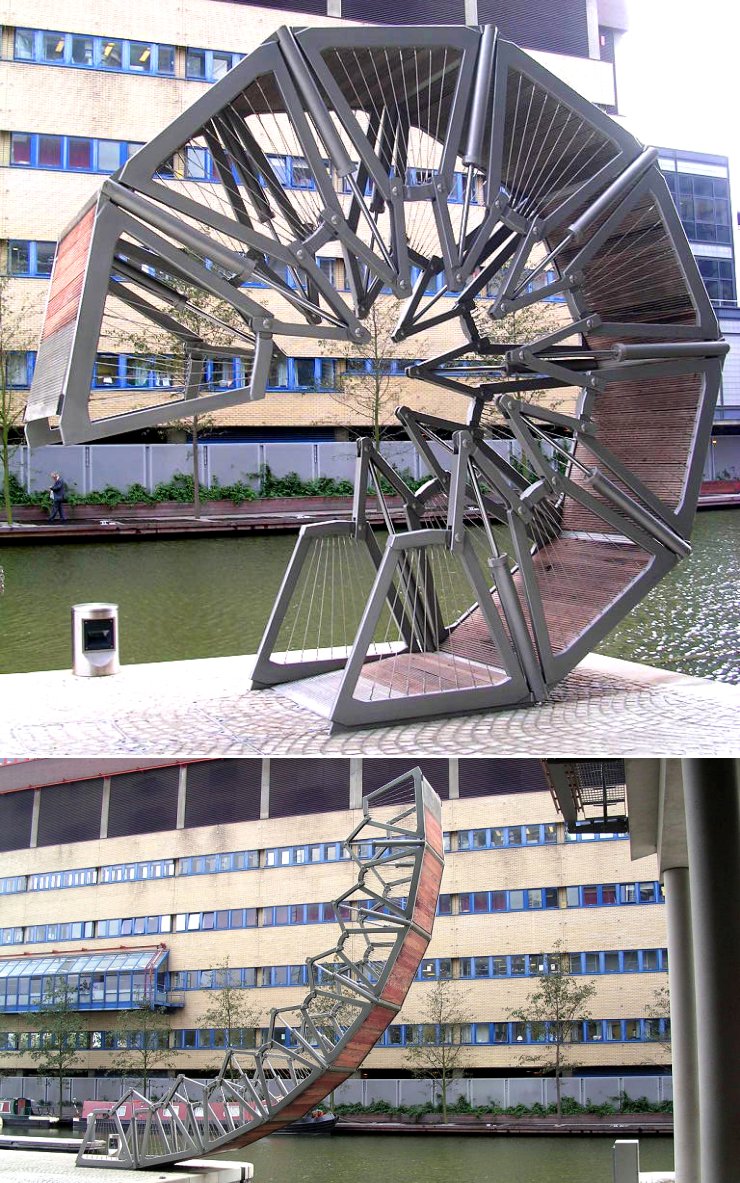
thomas heatherwick’s award-winning rolling bridge is an ingenious addition to the grand union canal system in london and is unique in its design. unlike regular movable canal bridges, the rolling bridge curls up on itself to form an octagon by way of hydraulics. it’s an amazing sight and a reminder that a fresh perspective can produce great, innovative results, even when dealing with a structure as common as a bridge.
beipanjiang river railroad bridge in guizhou is an enormous railway bridge that was built as part of the much larger ‘guizhou-shuibai railway project’ (pdf). connecting 2 mountains over a deep ravine, at its highest point the bridge’s deck sits 918ft above the ground (to compare, at its highest point the millau viaduct’s deck clears the river underneath by 890ft). the bridge has succeeded in connecting 2 of the country’s poorest areas.
‘henderson waves’ is singapore’s highest pedestrian bridge and can be found at the southern ridges, a beautiful 9km stretch of gardens and parks which has frequently drawn comparisons to new york’s central park. the bridge itself is absolutely stunning. the deck is made from thousands of balau wood slats, perfectly cut and arranged, and along the length of the deck a huge snaking, undulating shell cleverly forms sheltered seating areas on every upward curve. if i was to make sweet love to a bridge, this would be the one.
this is the incredible, brand new vertical lift bridge in rouen, france, a beast of a structure whose 2 bridge spans weigh 1′200tons each but can be hoisted 180ft vertically by the bridge’s lifting mechanism in an impressive 12 minutes. just the angular structures at the top of each tower weigh in at 450tons each, helping to support the lifting system as cruise ships sail through.
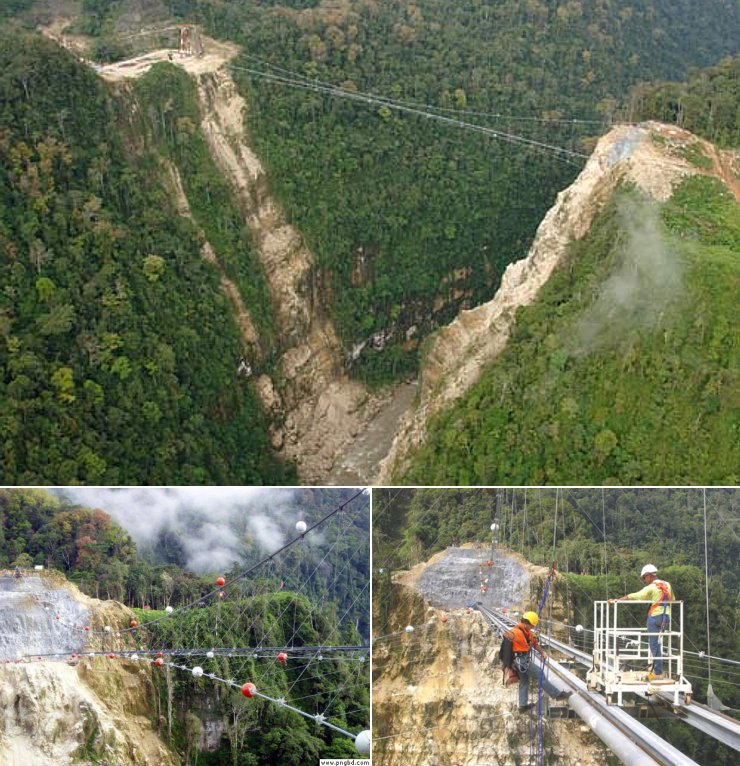
sources, clockwise from top: 1, 2 (pdf), 3
technically, this is a bridge: it’s a structure which spans a gorge. the only difference is, the bridge can’t be used by humans due to the fact that its purpose is to support 2 pipelines - 1 gas, 1 oil - across the extremely high gap in papua new guinea. so high in fact that if this were to be officially recognised as a bridge it would rocket to the top of the ‘world’s highest bridge-span’ list at an impressive height of 1′290ft. by comparison, the current highest bridge span belongs to the royal gorge bridge in colorado, hanging a mere 1′053ft above ground level, whilst manhattan’s chrysler building measures 1′047ft.