RSS
 

Author Archive

Tiny Spheres Turn Regular Microscopes Into Nanoscopes

01 Mar

Ordinary microscopes can see 8 times more minutely than known physical limits if miniature glass spheres are sprinkled onto samples, according to a new study.

The cheapest and most common microscopes use white light to magnify objects, but the nature of light and the limitations of our eyes mean those microscopes can’t image things smaller than bacteria. Other microscopy techniques, which use lasers, metamaterials and electron beams to image microscopic and nanoscopic worlds, can exceed such limits. But they are difficult, time-consuming and expensive to use, and they can kill live samples.

Glass microspheres about the size of red blood cells, however, described March 1 in Nature Communications, act like tiny magnifying glasses and bring normally invisible structures into sight. Stitching the microspheres’ images together with software could create unprecedented white-light photos.

“We have broken the theoretical limits of optical microscopy in white light,” said engineer Lin Li of the University of Manchester, a co-author of the study. “The surprising thing is the simplicity. One hundred dollars buys you about 100 million microspheres. Using conventional optical microscopes, almost anyone can do this.”

The microspheres may allow microscopes to image viruses in action or the insides of living cells. But the technique may not be as simple to use as the study’s authors say.

An independent group of microscope experts at Purdue University, led by physicist and engineer Vladimir Shalaev, couldn’t replicate similar images on their first attempt. But Shalaev said they’re working with the paper’s authors to be certain they did it correctly.

“It can be very hard to reproduce new experiments,” Shalaev said. “I have to admit this all sounds too good to be true. But if it is true, it’s going to be a huge, huge development.”

Microscope resolution is limited by diffraction, or the bending and spreading of light when it encounters obstacles like glass. What we see through microscopes is also restricted by cells in the eye’s retina, which can only detect light with wavelengths between 390 and 750 nanometers (between violet and red colors, respectively).

Image: Nature Publishing Group

These limitations prevent us from directly seeing objects smaller than 200 nanometers — just larger than a rabies virus or Mycoplasma, the smallest-known bacteria. Physicists and engineers have circumvented the 200-nanometer barrier with electron microscopy, laser fluorescence and nanoscale metamaterials, but they’re expensive, kill live samples or are difficult to use. So Li and his colleagues sought a new method.

In one experiment with glass beads between 2 microns and 9 microns wide, they could see 50-nanometer-wide holes in gold foil, or 8 times beyond the limits of conventional microscopy (image below). They were also able to see the tiny data grooves on a Blu-Ray disc (image above).

“This is quite cheap and easy to implement, while the alternatives are far more expensive and complicated,” Li said.

Physicist and engineer Igor Smolyaninov of the University of Maryland, who wasn’t involved in the research, has used metamaterials to image objects as small as 70 nanometers in size. He doesn’t think the new results are unreliable or untrue, but does see some limitations to the technique.

“They looked at artificial structures. Metal lines, holes and such. These are not a virus or bacteria, which are much, much more difficult to see because they move around,” Smolyaninov said. “I tried to do this before but couldn’t convince myself it was real. If they can pull it off, I’ll be extremely happy.”

Image: Top row: Three blocks of lines etched into a metal surface, as seen with a scanning electron microscope, with bunched-up microspheres covering the bottom block (left). The top blocks of lines aren't visible with a light microscope, but under the microspheres they are (right). Bottom row: A gold surface with 50-nanometer holes punched in it, as seen with SEM. A microsphere covers the bottom right (left). The same mesh, with the holes visible under the microsphere with a light microscope (right). Nature Publishing Group

Image: Top row: A Blu-Ray disc’s 100- and 200-nanometer grooves under a Scanning Electron Microscope (left). The same grooves are visible using microspheres with a light microscope (right). Bottom row: A 1,000-nanometer star etched into a DVD under SEM (left). The same star as seen through a microsphere (right). (Nature Publishing Group)

Citation: “Optical virtual imaging at 50 nm lateral resolution with a white-light nanoscope.” Zengbo Wang, Wei Guo, Lin Li, Boris Luk’ yanchuk, Ashfaq Khan, Zhu Liu, Zaichun Chen &
Minghui Hong.
Nature Communications,  Vol. 2 Issue 218. March 1, 2011. DOI: 10.1038/ncomms1211

See Also:


Word lengths are optimized for efficient communication [Psychological and Cognitive Sciences]

01 Mar
We demonstrate a substantial improvement on one of the most celebrated empirical laws in the study of language, Zipf's 75-y-old theory that word length is primarily determined by frequency of use. In accord with rational theories of communication, we show across 10 languages that average information content is a much better predictor of word length than frequency. This indicates that human lexicons are efficiently structured for communication by taking into account interword statistical dependencies. Lexical systems result from an optimization of communicative pressures, coding meanings efficiently given the complex statistics of natural language use.


WPS Portal and WCM

01 Mar

WPS Portal and WCM

Updated Collection of Feeds for your Google Reader
  • Base22 - Enterprise Web Evolution
  • The Tech Connection
  • Portal Solutions Blog
  • Uploads by IBMWebSpherePortal
  • Best Practice : WebSphere Portal & WCM
  • The Connections Blog
  • Twitter: Base22
  • A Portal to a Portal
  • Cody Burleson (cody_d_burleson) on Twitter
  • Latest News from WebSphere Journal
  • WebSphere Community Blog
  • WebSphere Notes
  • Lotus Connections wiki
  • Lotus Connections Wiki - Edits
  • WebSphere Portlet Factory wiki
  • WebSphere Portal wiki
  • WebSphere - WebSphere Application Server
  • Ben Shoemate
  • Ed Brill
  • developerWorks: Message List - WebSphere Portal
  • IBM developerWorks : Lotus
  • Lotus Rock Star
  • IBM Redbooks | Just Published
  • Support Forums : Thread List - News
  • WebSphere-World
  • WebSpherePower Magazine
  • The WebSphere Portal Blog
  • Google Alerts - lotus connections
  • Google Alerts - websphere portal
Preview this bundle


WPS Portal and WCM

01 Mar

WPS Portal and WCM

Feeds I read in Google Reader on IBM Websphere Products
  • The Tech Connection
  • Portal Solutions Blog
  • Uploads by IBMWebSpherePortal
  • A Portal to a Portal
  • WebSphere Notes
  • Lotus Connections wiki
  • Lotus Connections Wiki - Edits
  • WebSphere - WebSphere Application Server
  • Ed Brill
  • developerWorks: Message List - WebSphere Portal
  • IBM developerWorks : Lotus
  • Google Alerts - lotus connections
  • Google Alerts - websphere portal
Preview this bundle


Re: theme policy -import xml giving FileNotFound Exception

01 Mar
Hi Jim,
Hopefully by this week i will be given admin access for our test portal by the admin team.Once I get that i will try it and see how it goes. Will keep you posted with the status.

thanks


Have data graphics progressed in the last century?

01 Mar

Received a wonderful link via reader Lonnie P. to this website that presents a historical reconstruction of W.E.B. DuBois's exhibit of the "American negro" at the 1900 Paris Expo. Amusingly, DuBois presented a large series of data graphics to educate the world on the state (plight) of blacks in America over a century ago.

You can really spend a whole afternoon examining these charts (and more); too bad the charts have poor resolution and it is often hard to make out the details.

***

Judging from this evidence, we must face up to the fact that data graphics have made little progress during these eleven decades. Ideas, good or bad, get reinvented. Disappointingly, we haven't learned from the worst ones.

Exhibit A 

  Dubois_a

(see discussion here)

Exhibit B

Dubois_b

 (see discussion here)

Exhibit C 

  Dubois_c

(See discussion here.)

Exhibit D

Dubois_dd
 (see the Vampire chart here)

Exhibit E

Dubois_e
(see the discussion here.)

Exhibit F

Dubois_f
(see discussion here.)


IBM: Why We’re No Google or Bing

28 Feb
While IBM could probably use Watson technology to power a public search engine, it seems they have no interest in unseating Google.

Read | Permalink


ASSISTING IT PROFESSIONALS SINCE 1999
You are invited to visit the largest directory of IT newsletters on the 'Net -- where IT newsletters, whitepapers and RSS feeds from elite publishers are listed.

FreeTechMail is a unique place to view sample newsletters and RSS feeds as well as subscribe and manage your newsletter subscriptions.

Find out why 2.6 million IT professionals use FreeTechMail. Visit today.


Best Rare-Bird Pictures of 2010 Named

28 Feb
From the marvellous spatuletail to a flightless parrot, see 12 award-winning pictures of birds most in danger of extinction.

Email this Article Add to del.icio.us Add to digg Add to Facebook Add to StumbleUpon Add to Google Add to Reddit


WordPress 3.1 Is Big Leap Into CMS

28 Feb

WordPress 3.1 Is Big Leap Into CMS

This content from: Duct Tape Marketing

Regular readers to this blog know that I’m a WordPress fan. You may have noticed that I updated the look of the blog with a new theme. At that time I also converted the entire site to WordPress – a feat that I think shows off the power and flexibility of this publishing tool to be a singular content management tool for small business.

The most recent update to WordPress includes some significant feature upgrades and in my opinion moves the tool even farther into the ability to serve as the tool of choice for any web site.

Key feature additions include:


Quick overview of the Internal Linking function

Internal link – This has to be my favorite new feature and reason enough to upgrade if you’re stalling. A very common practice in blogging is to link to other relevant content from past blog posts. In the past this was accomplished by finding the other post and copying the URL to embed in a link. No big deal unless you’ve got over 2,000 posts. Now, when you are editing a post (only when using the visual editor :( ) you have the ability add a link from any page or blog post, including searching through all posts, right from the link editing tool.
Post formats – The new style of WordPress theme takes advantage of multiple page templates in order to accomplish things like I’ve done on thhis site (my home page is a WordPress page template using the Builder Theme from iThemes) With the advancement of WordPress 3.1 comes something called Post Formats. Post Formats allow theme designers to create multiple views of blog post so that sites can have different post layouts inside the same theme for different content.

Theme designers now have the ability to create post formats that include:

  • Aside – Typically short pieces of content, published without a title.
  • Image Gallery – A collection of pictures in a gallery format.
  • Link – A single link.
  • Image – A single image.
  • Quote – An inspirational or noteworthy quote with a citation.
  • Status – Status updates, similar to Facebook and Twitter updates.
  • Video – A single video.
  • Audio – A single audio clip, like a song or a podcast.
  • Chat – An instant message transcript.

The ability to create custom post formats (post types) has been around for some time, but now designers have an ordained set of format names that will allow for standardization across themes. For a tutorial on how to get started with Post Formats visit this Wordcast Tutorial:Add Tumblr Style Features To Your Blog with WordPress 3.1

You might also want to check out this online seminar from my friends at iThemes – WordPress Advanced Custom Post Formats – Wed March 2nd 11 am CT

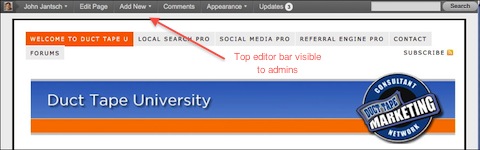
Admin bar – Next up is a new editing bar that appears above posts for admins when viewing live content. The idea behind this feature is that it offers easy editing and navigation directly from any blog page. I kind of like this as I tend to edit some things this way, but a lot of admins are complaining that it’s in the way and needlessly adds more clutter. (Top nav bars like the Hello Bar are getting popular as well and this may cause some conflicts with these kinds of scripts.) The top nav is turned on by default, but you can switch it off by visiting your account settings.

This nav bar appears by default for admins


All of Facebook’s Like Buttons on Third-Party Sites Now Publish a Full News Feed Story

27 Feb

When users click the Like or Recommend button on a third-party website or within a Facebook app, it now publishes a full news feed story instead of just a one-line Recent Activity story. Previously, full stories with headlines, thumbnail images, and captions were only published if the website chose to implement the “Like with Comment” version of the button and users chose to add this additional context.

As the Like button now encompasses the functionality of the Share button, which Facebook has removed from its documentation, Facebook may phase out the Share button entirely. The change gives more prominence to outbound links in the news feed and on a user’s wall, and so will increase referral traffic and draw more sites to add the Like button.

Full stories appear larger, more compelling since they often include an image, and are ranked better in the news feed than Recent Activity stories. Therefore, the stories generated from clicks of the Like / Recommend button will been seen by more of a user’s friends and drive more traffic to third-party websites and apps than before.

Since Facebook launched its social plugins including the Like button at last year’s f8 conference, over 2.5 million websites have integrated them. In July, Facebook introduced Like with Comment, allowing some implementation to publish full feed stories.

By August, 350,000 sites had Like buttons, and that count is probably much higher now. Facebook has since allowed developers to integrate Like buttons with social games and other Facebook apps, and is trying to increase third-party awareness of their ability to publish news feed stories to those who click their buttons.

Up until now, Facebook had supported three different ways to share third-party content to the news feed:

  • The Share button –  When clicked, users see a Facebook Publisher dialog pop up allowing them to add a comment. It publishes a full feed story, similar to if the user had copied the link into the Publisher on Facebook.com. The Share button doesn’t subscribe users to future updates from the owner of the button.
  • The Like / Recommend button without comment – When third-parties use the standard iframe Like button with a width less than 400 pixels, the button_count, or  box_count version of the Like / Recommend button, users aren’t given the option to comment. A simple, one-line story linking to the content is published to the Recent Activity feed of the user’s wall, and the story is less frequently displayed in the news feeds of friends. Users are subscribed to future updates from the button’s owner.
  • The Like / Recommend button with comment – When third-parties implement the XFBML version or the standard iframe version with a width of 400 pixels or more, users are always given the option to comment. If they comment, a full story is published. If they don’t comment, a simple story is published. Users are subscribed to future updates from the button’s owner.

Now, all versions of the Like / Recommend button publish a full feed story, whether a comment is added or not. The change has been applied retroactively, so old Recent Activity feed simple stories from Likes now appear as full stories.

Likes allow third-parties to publish future updates to a user, and therefore drive more traffic and create more lifetime value than Shares. This value lures additional third parties to implement Facebook’s social plugins, so it’s in Facebook’s interest to shift everyone from Share buttons to Like buttons.

The Share button is often displayed amongst a set of other buttons for Twitter, Digg, bookmarking, and email, but Facebook would rather have its own real estate opposed to being lost amongst the competition. Now that Facebook has given the Like button almost a year to prove its worth, third-parties would probably implement a Like button if they could no longer use the Share button, granting Facebook this improved placement.

The phase out of the Share button is evident in Facebook’s documentation. The “Facebook Share” typeahead result  shown when searching for “Share” on the developers site directs to the Like button documentation page.

One potential downside for users is if they participate in contests run by sites or apps that use Like buttons to tabulate votes. Some users might not want to publish a full feed story for each vote, and would have to delete the posts one by one after they’re published.

Overall, the change will benefit users, third-parties, and Facebook. Compelling Liked content from around the web will appear in the news feed more frequently, initiating discussions between friends. Third-parties will gain traffic from new users, inspiring more to implement Facebook’s social plugins.

This increased presence across the internet will spread awareness of Facebook, raise barriers for its competitors, and seed a client base for a potentially monetizable plugin, such as an Open Graph ad unit.

[Thanks to Amit Lavi and Paula Ford for the tips]